MS PowerPoint presentations are used to enhance communication, increase audience engagement, and improve message retention through visual aids like images, charts, and multimedia. They facilitate professional storytelling, allow for easy collaboration, and offer customizable templates for efficient, structured, and persuasive delivery. Across every field, whether Finance, HR, IT, Operations, Marketing, or even as a university student PowerPoint is widely used for creating presentations. While AI tools (like Gamma) have emerged to generate presentations in seconds, PowerPoint’s entrenchment in corporate environments, combined with its integration of Microsoft 365 Copilot, ensures its continued dominance.
Top Presentation Problems & AI Remedy
Some of the most common challenges people face when creating presentations, and how AI can help resolve those challenges, are as follows:
- Don’t know where to start: AI can help break the inertia by generating slide outlines, suggest titles, generate starter content.
- Struggle to structure thoughts: AI organizes messy ideas into clear sequences ,i.e, From Problem to Solution to Benefits to Call to action. Also, there is an option to generate multiple variations instantly, i.e., based on your prescribed format (RAC, etc.).
- Slides look boring and outdated: AI design tools suggest layouts, color schemes and images. Some of the tools that are helpful in this aspect are Canva, Gamma, Napkin.
- How to present each slide: AI writes speaker notes to match your tone and intent. There is an option to convert notes to voice as well. Tools like ChatGPT, TTSMP3, Yoodli are useful in this aspect.
- It takes too long to finish the presentation slides: AI speeds up every stage from content generation, visual polish, export ready decks, voice practice. Tools like ChatGPT, canva, google slides are helpful here.
Tips for Better Presentations
Find the following tips that can augment your presentations to the next level.
- Lead with the answer, then prove it (Top-down approach)
- One slide one message (Think clarity & not compression)
- Turn slide titles into executive insights (Titles should answer a question, not just be a label)
- Don’t bury your best insight, highlight it
- Substitute the bullet points (Replace text with visuals)
- Design that directs attention, not distracts (Big/bold letters, white spaces, etc)
- Make colour work for you, not against you (Maximum of 2 bright colours is ideal)
- Design for the device (Design for multiple size screens)
Workflow for Faster Slide Preparation
Stage 1 : Research & Ideation
From blank slides to big idea: In this stage, the deck structure and message clarity are obtained. For this, the AI tools like Gemini, ChatGPT, Perplexity, Claude etc can be used. For example, let us say you are hired to reduce customer churn at Flipkart, an e-commerce company. The prompt to be used on a AI tool would be as follows.
[Prompt] Act as an expert AI management consultant. Help create content for a 5 slide pitch deck to reduce churn in e-commerce using AI for Flipkart. Use research papers, blogs, articles available online for facts. Cite the sources, keep them credible. Follow the pyramid principle, keep slide title as “so-what” instead of a boring captions. Don’t add too much text or make it wordy.
Stage 2 : Design & Assembly
Design slides that speak for themselves: Start in Gamma to move fast, polish in Canva for brand feel. From the Stage 1 prompt, you have an output, but for it to be usable on Gamma, you need to polish it. For that you need to provide the following prompt.
[Prompt] I want to create a ppt with the above output on Gamma(free version). Help me draft a prompt to explain better. Act as an expert AI management consultant. Prepare a 5-6 slide deck on the above content. Use research papers, blogs, and articles available online for facts. Add icons, graphs, visuals and make it aesthetically appealing to present to the Flipkart country head. Follow the pyramid principle, keep slide title as “so-what” instead of boring captions. Increase text size for key figures and numbers.
Once you login to Gamma using this link, you will find the screen below.
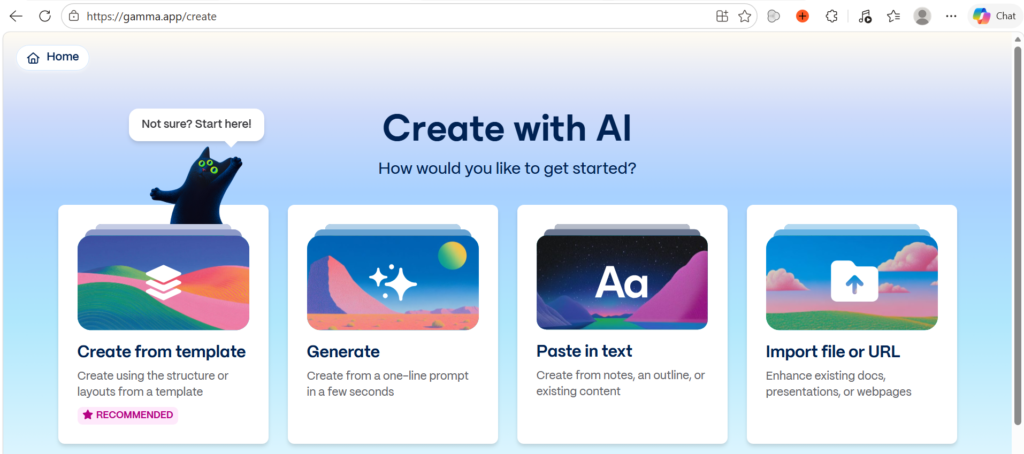
Click on the “Paste in text” option shown in the above screen and paste the output of the earlier prompt in the subsequent screen as shown below.
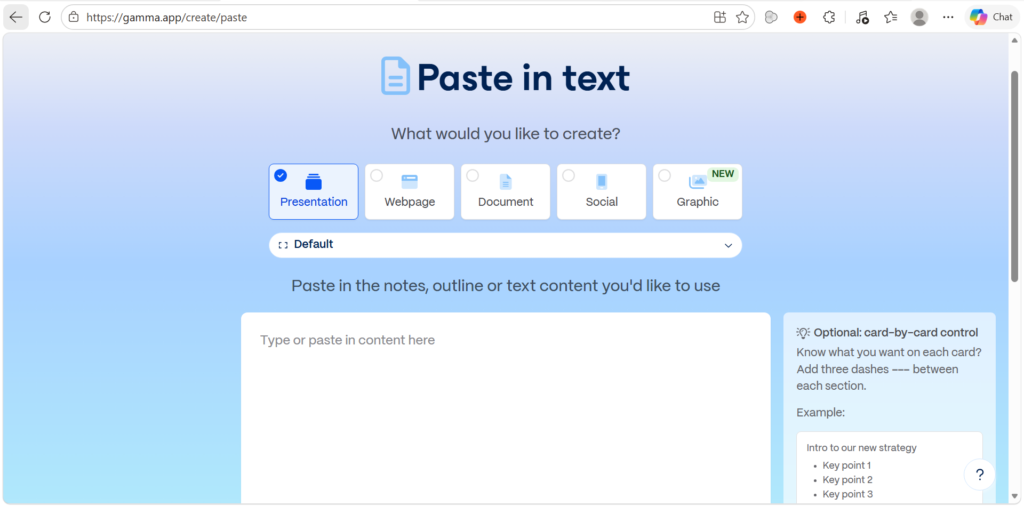
If you scroll down in the above screen, you will find the “Generate from notes or an outline” option that you need to select and click on the button “Continue to prompt editor”. The next screen will appear as follows.
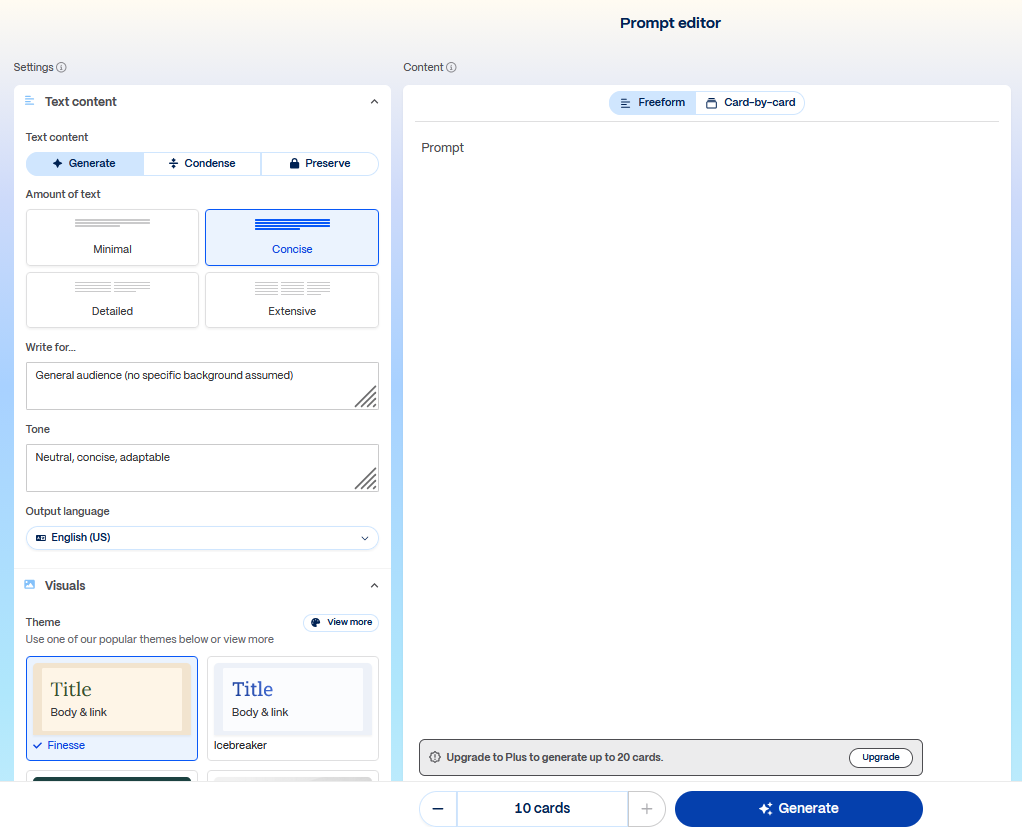
In this screen, you can either Generate/Condense based on the pasted content, set the amount of text to be output, set the theme, image source. Once everything is done, click on the Generate button below for Gamma to generate the slides. The generated output of Gamma slides can be further edited manually on Canva to make it visually amazing.
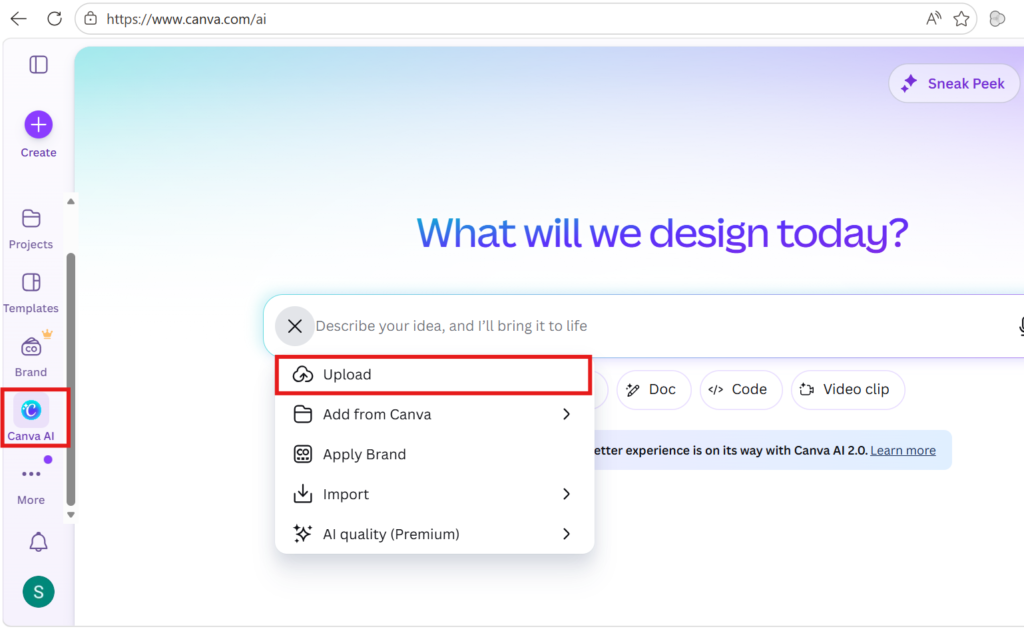
On Canva, as shown above, use the Canva AI option and upload the ppt obtained from Gamma (use share to export as ppt from Gamma) to edit it or use ready-made templates to create your slide.
Napkin is an amazing website for infographics and visuals that can be used to generate visuals for the canva slides. Export the visuals in png format and paste it to your ppt.
Alternatively, you can use the Genspark tool, which combines Stage1 and Stage2 to build your complete deck.
Stage 3 : Fact check & Speaker notes
At this stage, you review your presentation content for accuracy, while also refining the tone and ensuring the delivery is confident and appropriate. The tools used for each of these are as follows:
Perplexity.ai
For fact checking, make use of the following prompt on perplexity.
[Prompt] Fact check all the content, if the content is right show me references with clickable links. Otherwise, tell me where it is wrong and search for content with references.
Copyleaks.com/plagiarismdetector.net
Upload or paste your deck/contents on plagiarismdetector.net to check the uniqueness of the content.
ChatGPT
Presentation notes prompt for the speaker to practice on ChatGPT.
[Prompt] Help me draft a clear, compelling speaker notes for the attached ppt to present to flipkart head. Make me sound professional, smart, persuasive, convincing and keep the text short. My presentation will be for 5mins, so please adjust the content length accordingly, keeping in mind I present in a medium pace.
yoodli.ai/ttsmp3.net
For rehearing tone, pacing and timing make use of this tool. Customize your content for the tool by mentioning the tool name in the above prompt. Copy and paste the output of the above prompt into either yoodli/ttsmp3 tool to convert it into voice.
Further Reading :

Leave a Reply